Showing posts with label Android. Show all posts

Tuesday, 31 January 2012

How To Root Android Phone With SuperOneClick

Requered:
  • SuperOneClick
  • If you run Microsoft Windows, install .NET Framework v2.0 or above
  • If you run Mac or another Linux flavor, make sure you install Mono
1. Download SuperOneClick (2.3.3), and install on your computer.
2. Connect your phone to computer with USB cable, DO NOT mount your SD card. and put your phone on USB Debugging mode.


3. Open SuperOneClick and select ROOT

Operations systems support:
  • Windows Vista
  • Windows 7
  • Ubuntu Hardy (8.04 LTS)
  • Ubuntu Jaunty (9.04)
  • Ubuntu Karmic (9.10)
  • Ubuntu Lucid (10.04 LTS)
  • Ubuntu Maverick (10.10)
  • Debian Lenny (5.0)
  • Debian Squeeze (testing)
  • Debian Sid (unstable)
  • Debian Experimental
Compatibility list:
  • Acer Liquid Metal
  • Dell Streak
  • HTC Magic (Sapphire) 32B
  • HTC Bee
  • LG Ally
  • Motorola Atrix4G
  • Motorola Charm
  • Motorola Cliq
  • Motorola Droid
  • Motorola Flipside
  • Motorola Flipout
  • Motorola Milestone
  • Nexus One
  • Samsung Captivate
  • Samsung Galaxy 551 (GT-I5510)
  • Samsung Galaxy Portal/Spica I5700
  • Samsung Galaxy S 4G
  • Samsung Galaxy S I9000
  • Samsung Galaxy S SCH-I500
  • Samsung Galaxy Tab
  • Samsung Transform M920
  • Samsung Vibrant
  • Sony Ericsson Xperia E51i X8
  • Sony Ericsson Xperia X10
  • Sprint Hero
  • Telus Fascinate
  • Toshiba Folio 100
Incompatibility list:
  • Sprint EVO 4G (HTC Supersonic)
  • Droid Incredible (HTC Incredible)
  • HTC Desire GSM
  • HTC Desire CDMA (HTC BravoC)
  • HTC Aria
  • Droid Eris (HTC DesireC)
  • HTC Wildfire (HTC Buzz)

Monday, 9 January 2012

What Is Root?

On many computer operating systems including Unix, Linux and Android, the root account is a special user with complete access to all files and commands. Various names for this type of account might include, administrator, superuser, or supervisor.

In the context of Android, root access allows the user to have complete control over their divice. Root access is commonly granted for developers allowing them access to all files and commands on the device.

With full root access to a device, there is potential for damage. Any user with root access is strongly cautioned to be very careful.


Friday, 23 December 2011

SD Card Partitioning Using MiniTool Partition Wizard

Download "MiniTool Partition Wizard Home Edition" here
This tool is compatible with Windows 2000/XP/Vista & Windows 7

Requirements: USB SD Card reader.

Step 1: Delete old partitions on SD card.
Note: this partition manager QUEUES the operations. So nothing is deleted and changed UNTIL you click "APPLY" and then confirm by clicking "OK".

WARNING!
Make sure you are deleting partition on SD card! (not your hard drive for example). This step deletes everything on SD card, so backup files first!. Dont be afraid, just read everything and think twice before selecting correct drive.
Do you see three gray icons on the bottom? Under each of them the capacity of each drive is listed, and SD CARD has slightly different icon. Hard drives on the screenshot have 465.8GB and 74.5GB, and on the bottom, the SD card, with 3.8GB capacity.
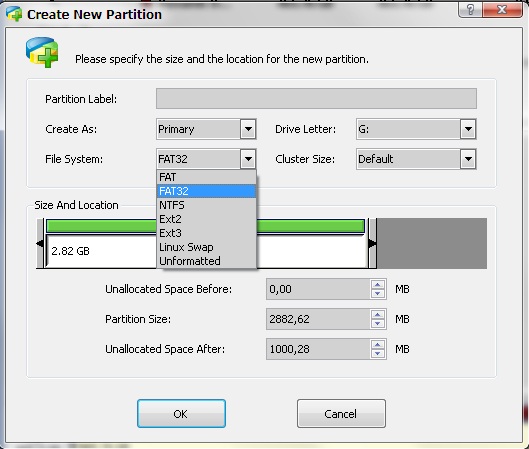
Step 2: Create FAT or FAT32 partition
select "Create As": PRIMARY
Select "File System:" FAT when you have 2GB or smaller card.
Select "File System:" FAT32 when you have 4GB or greater card.

Step 3: Create ext2 or ext3 or swap partition*
Select "File System:" ext2 - for App2SD OR Select "File System:" swap to make swap.
If you want to create both: do not assign all the space for the first one :) this way you will have space for creating second one.

Step 4: finish.
finally, click "apply" button on top left corner.
partitions will be created and card will be formatted.

(xda developers)

Tuesday, 20 December 2011

How To Root Samsung Galaxy Young S5360

  1. Download the file attached (update.zip) here.
  2. Copy ZIP file to your SD-card.
  3. Turn off your phone.
  4. Switch ON your device in the recovery Mode (hold power, volume up, home button together).
  5. Select update from SD Card option.
  6. You will see that the list of files will come from which you will have to select the file which is named as Update.zip
  7. Wait a few minutes.
  8. And Your Galaxy Y S5360 is now rooted!

Sunday, 18 December 2011

A Faster Facebook for Android

Today Facebook is launching an updated Facebook app for Android. It's now quicker and easier to view photos, get messages and navigate around the app.

Photos get better
Photos and albums are up to two times faster than the previous Android app. It's also easier to share photos, view comments and edit captions on the go.

View photos with tags, comments and likes

Messages on top
Your messages and notifications are now at the top of your screen. You can respond to friends and stay updated without leaving the page you're on.

Get notifications and messages at the top of every screen

Menu on the side
You can quickly access your News Feed, Groups, games and apps from the new left-hand menu. The features you use most are now at your fingertips.

Use the left-hand menu to get around

Get the App
Facebook for Android is available on Android Market.

(The Facebook Blog)